Want to use Twitter to promote your OnlyFans? Good idea! Twitter (X) is one of the few platforms that tolerates adult content, which makes it a go-to channel for OnlyFans creators. With the right strategy, you can build an engaged audience and convert your followers into paying subscribers.
Twitter offers a freedom you won’t find on TikTok or Instagram. You can post suggestive content, interact directly with your target audience and share your OnlyFans link without risking a ban. Here are the strategies that work.
Your Twitter profile is your shop window. It should make people want to follow you and discover your OnlyFans. Optimise every element: your profile picture, your banner, your Twitter bio and your link.
Essential elements of your profile:
- An attractive profile picture that shows your face or your style
- A banner that reflects your niche and your OnlyFans content
- A clear bio with emojis and your OnlyFans link
- A direct link to your OnlyFans page in your bio
Post content that grabs attention
On Twitter, your posts need to capture attention in a few seconds. Photos and videos generate much more engagement than text alone.
Types of posts that work:
- Suggestive (but not explicit) photos with a teaser
- Short videos that give a preview of your OnlyFans content
- Engaging tweets that invite interaction
- Behind-the-scenes of your life as a creator
To avoid the classic promotion mistakes, read our article on the mistakes to avoid on social media.
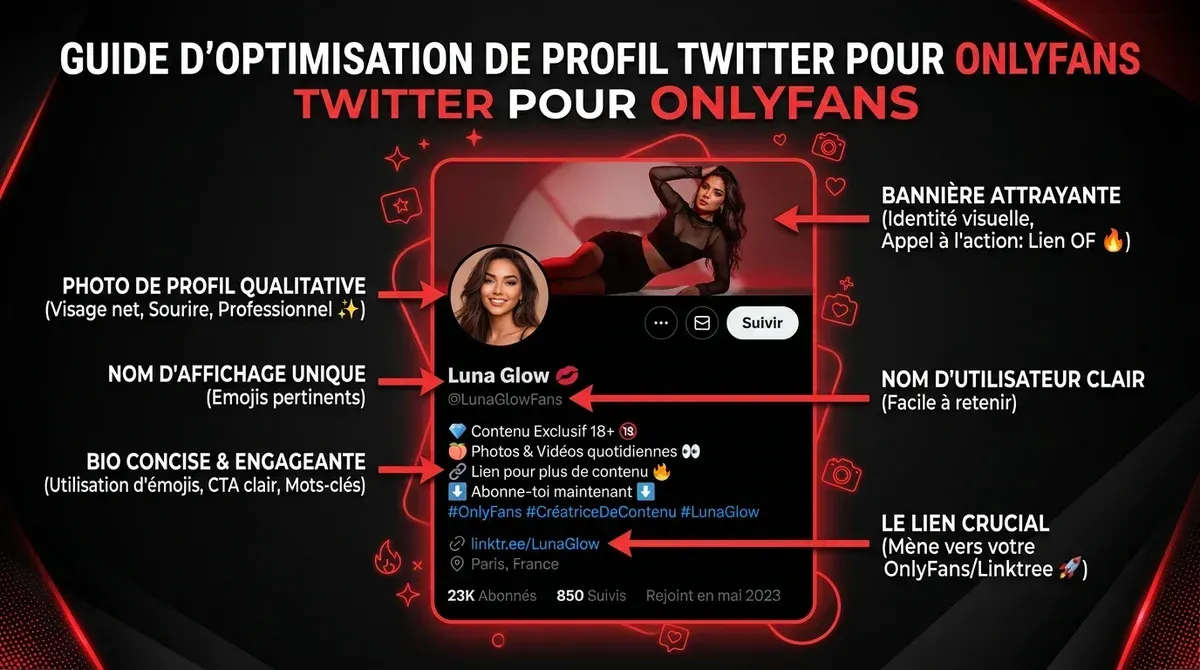
Optimise every element of your Twitter profile
Grow your engagement and your followers
Having followers is good, but having an engaged audience is better. Engagement on Twitter boosts your visibility and draws new followers to your OnlyFans.
Interact with your niche
Don’t just sit in your corner posting. Engage with other creators and with your target audience. Comment, like, retweet. Twitter rewards activity.
Engagement strategies:
- Reply to every comment on your posts
- Engage with other creators in your niche
- Join your audience’s conversations
- Use polls to involve your target audience
Post at the right times
The timing of your posts has a strong impact on their visibility. Analyse when your target audience is most active and adapt your posting schedule.
To maximise your income once you’ve gained followers, discover our 9 secrets to boost your OnlyFans earnings.
An effective Twitter strategy combines several elements: hashtags, posting frequency and content type. Here are the best practices.
Hashtags increase the reach of your posts. Use a mix of popular hashtags and niche hashtags to reach the right audience.
Recommended hashtags: #OnlyFans, #OF, #OnlyFansPromo, #ContentCreator, plus hashtags specific to your niche.
Ideal posting frequency
On Twitter, quantity matters. Successful OnlyFans creators post several tweets a day. The algorithm favours regular activity.
Posting recommendations: at least 3-5 tweets a day, spread throughout the day. Include photos, videos and text tweets for variety.
To understand why some creators fail to break through, read our analysis of why OnlyFans creators fail.

Track your engagement statistics
Running an active Twitter presence takes time. Tools can help you automate some tasks and analyse your performance.
Tools like Buffer or Hootsuite let you schedule your posts in advance. You can prepare a week of content in a single session.
OnlyFans asks you to link your Twitter account for verification. It’s also a simple, effective way to cross-post your content and keep a consistent presence on both platforms.
To link your account: go to your OnlyFans settings, in the “Social media” section, and connect your Twitter. This also lets you automatically share your OnlyFans posts on Twitter.
Measure and adjust your strategy
A good Twitter strategy is based on data. Regularly analyse your performance to understand what works with your target audience.
Metrics to track
The key indicators for measuring how effective your Twitter strategy is:
- Follower growth (new followers per week)
- Engagement rate on your posts (likes, retweets, comments)
- Clicks on your OnlyFans link
- Conversions into paying subscribers
Adjust based on results
If certain types of posts generate more engagement, do more of them. If others fall flat, adjust. The key is to test, measure and optimise continuously.
To find out what income you can expect, check our analysis of the average salary on OnlyFans.

Build your Twitter strategy
FAQ: Twitter and OnlyFans
Twitter is one of the best channels to promote your OnlyFans. Create an optimised profile with your Twitter bio and your link, post attractive content regularly (photos, videos, engaging tweets), use the right hashtags, and interact with your target audience and your niche.
To gain followers on Twitter: post quality content several times a day, engage with your audience and other creators, use relevant hashtags, and be consistent. Growth takes time, but Twitter rewards consistency.
OnlyFans uses Twitter to verify your identity and your social media presence. It’s a simple security measure that helps prevent fake accounts. Linking your Twitter also lets you share your OnlyFans content easily.
This page contains partner links: Fans Guru may earn a commission if you sign up through them, at no extra cost to you.